Know which room is ready — at any moment.
The day before, your reception enters which rooms are check-outs and which are stay-overs. Our housekeepers work from that programme on their phones, and you get an e-mail as soon as each room is done. No more “is 105 ready yet?” calls.

Four steps, every day
Reception enters tomorrow
For each room: check-out with departure time, or stay-over (service) from the time it can be cleaned. VIP, early check-in and notes in one click.
We organise the housekeepers
Our office assigns the rooms, and our driver moves the housekeepers between hotels on time.
The housekeeper taps “Done”
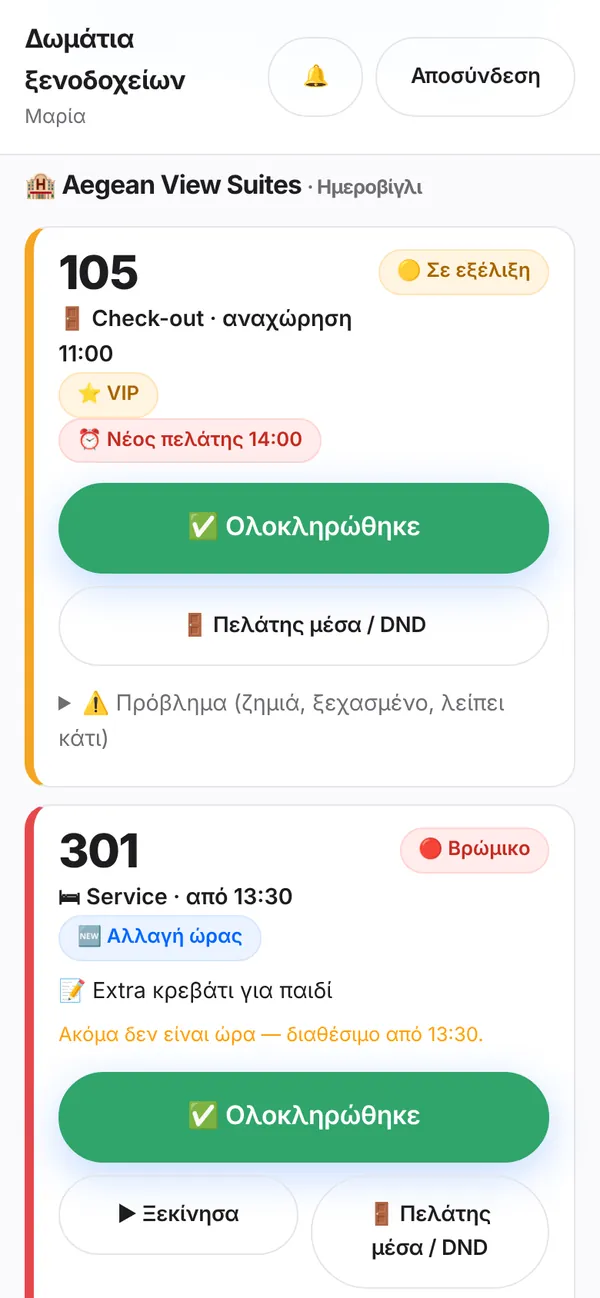
From her phone, for every room. If the guest is still in, or she finds something, you are told straight away — with a photo.
You know immediately
An e-mail as soon as each room is ready, a live board at the reception and a day summary in the evening.
📝 Tomorrow's programme in a few minutes
All the hotel's rooms in one list. Pick check-out or stay-over, type a time, save.
- “↻ Service from yesterday” copies the previous day's stay-overs
- ⭐ VIP and ⏰ “new guest at 14:00” — the housekeeper sees them first
- Change a time after saving: the housekeeper sees “🆕 Time changed”

🟢 Live status of every room
At a glance: 🔴 dirty, 🟡 in progress, 🟣 guest in / do not disturb, 🟢 ready — with the time it was finished and who cleaned it.
- Refreshes on its own every 30 seconds
- A “late” flag when a room falls behind
- Forgotten items and damage show on the room, with a photo
✉️ An e-mail the moment each room is done
No need to ask. It goes to the owner, the reception or both — your choice.
- “✅ Room 105 ready”, with time and housekeeper
- “🚪 Guest in / DND”, so you know why it is not done yet
- “⚠️ Forgotten item / damage”, with a photo
- A day summary in the evening: what was done and what is left

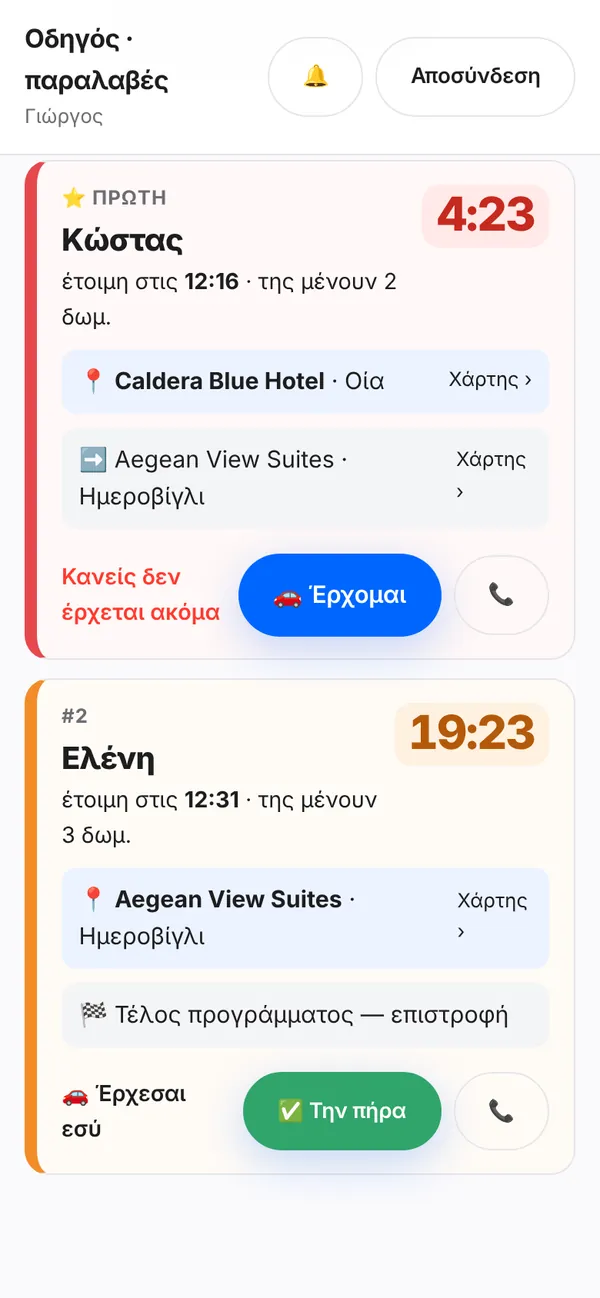
Real screens of the system with demo data. The hotel portal is in Greek.
Our team works from the same programme
Whatever your reception enters reaches the housekeeper's and the driver's phones at once — so rooms are done in the right order and nobody waits around.
🧹 The housekeeper
Sees all her rooms in time order, with VIP, early check-in and notes. One tap on “Done” and you are informed.
🚗 The driver
When a housekeeper taps “Finishing in 30′”, the driver sees a countdown and is reminded 10′ before — no time lost between hotels.
In control without being there
Two roles
The owner sees everything and decides who gets the e-mails. The reception enters the programme and follows the status.
Only your hotel
Each hotel sees only its own rooms and reports.
Clear billing
Every check-out and stay-over is recorded with its time. The monthly bill comes from the same data you see.
From anywhere
Works on computer, tablet and phone, in the browser. Nothing to install.
Your day with the system, in 5 steps
- By the eveningOpen “Πρόγραμμα καμαριέρας” (housekeeping programme). It opens on tomorrow by itself.
- Check-outsFor every departure choose “Check-out” and type the time. If a new guest arrives early, fill in “new guest at”.
- Stay-oversFor staying guests choose “Service” and the time the room can be cleaned. “↻ Service from yesterday” fills them in for you.
- SaveTap “💾 Save”. You can change things on the day too — the housekeeper sees it immediately.
- During the dayOpen the live room status, or simply wait for the “✅ Room ready” e-mails.
Frequently asked questions
No. You log in from the browser on a computer, tablet or phone with your hotel's account.
Change it in the programme and save. The housekeeper sees “🆕 Time changed” on that room on her phone.
The owner, the reception or both. The owner sets it from their account and can change it at any time.
The housekeeper taps “Guest in / DND”. You get an e-mail, the room turns purple on the board and she comes back later.
As many as you need: one for the owner and as many as you like for the reception, all for the same hotel.
Request a demo. We set up your hotel's rooms together, create the accounts and show your reception how it works.
Want to see it with your own hotel's rooms?
We show it at your hotel or online, and prepare the programme with your rooms.